We are now allowing customers to purchase gift cards online through our online ordering portal. When a customer purchases a gift card they are issued a QR code and 16 digit card number. These are the 2 searchable methods that a customers gift card can be applied to a check. **THIS IS EASIEST TO DO FROM A HANDHELD; THEY HAVE FRONT FACING CAMERA FOR SCANNING QR codes**
Taking a Digital Gift Card
Taking a digital gift is just like taking a physical gift card but you will need to scan the guests QR code or enter their gift card number manually to accept it.
- When inside of an open order, select the Pay option.
- Select the Gift Card option
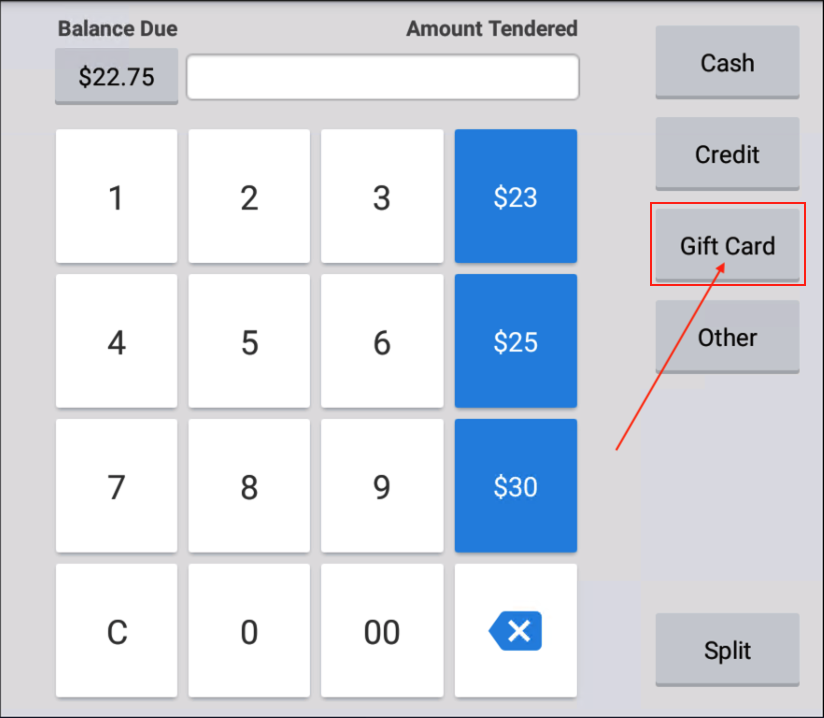
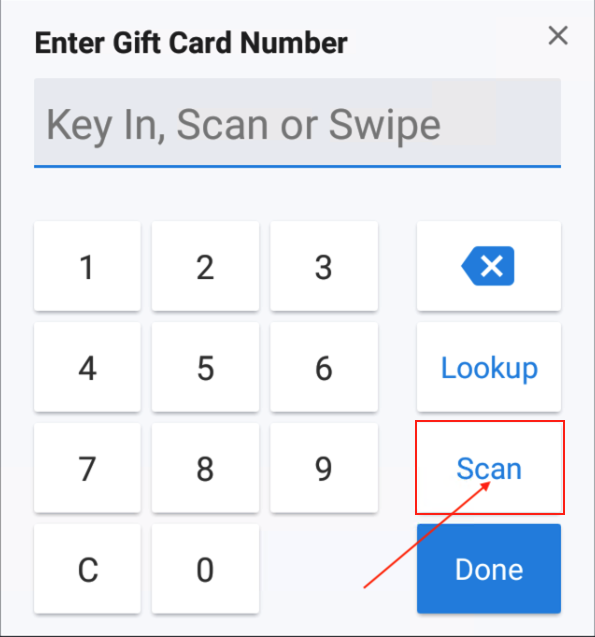
- To Find Gift Card by Card Number: simply enter the card number and select Done. If the card is found, the amount will be applied to the gift card.
- To Find Gift Card by QR Code: Select Scan, the devices camera will open. Place the customers QR code within the window and the system will search for the card number
Was this article helpful?
That’s Great!
Thank you for your feedback
Sorry! We couldn't be helpful
Thank you for your feedback
Feedback sent
We appreciate your effort and will try to fix the article